
Open App Store Connect and let your developer prepare your company’s app
App Store Connect is Apple’s website for managing apps: test versions, the App Store page and releases. It comes with your company’s Apple Developer membership. This guide is the next step after enrolment: you check Apple’s agreements, invite your developer with the right role, and they set up the app’s record.
- Who
- The Account Holder (the director who enrolled your company)
- Your time
- 15–20 minutes
- Waiting time
- Up to 3 days for your developer to accept the invitation
- Cost
- None beyond the membership
- Needs first
- An active Apple Developer membership
Why this matters
Everything Apple needs about the app lives in App Store Connect, and it all belongs to your company’s membership. Your developer needs enough access to upload test versions and prepare the App Store page, but not the power to change your company’s legal agreements, bank details or team.
| Role | What it can do | Who has it |
|---|---|---|
| Account Holder | Everything, and the only role that can sign Apple’s legal agreements and renew the membership | You |
| Admin | Almost everything, including adding and removing people | Not needed for your developer |
| App Manager | Create the app’s record, upload builds (versions of the app), run TestFlight testing and submit to the App Store | Your developer |
App Manager is enough for the whole build. You can change your developer’s role or remove them at any time.
Have these ready
- The Apple Account you used to enrol your company, with two-factor authentication on
- Your developer’s name and email address, which they send you
- Whether the app will charge money or sell anything inside it (your developer can tell you if unsure)
- If it will: your company’s bank details and tax details to hand
Step by step
Sign in to App Store Connect
Go to appstoreconnect.apple.com and sign in with the Apple Account you used to enrol. You’ll see a row of tiles, such as Apps, Users and Access, and Business.
TipIf App Store Connect says you have no access, the membership may not be active yet. Check the membership page at developer.apple.com/account.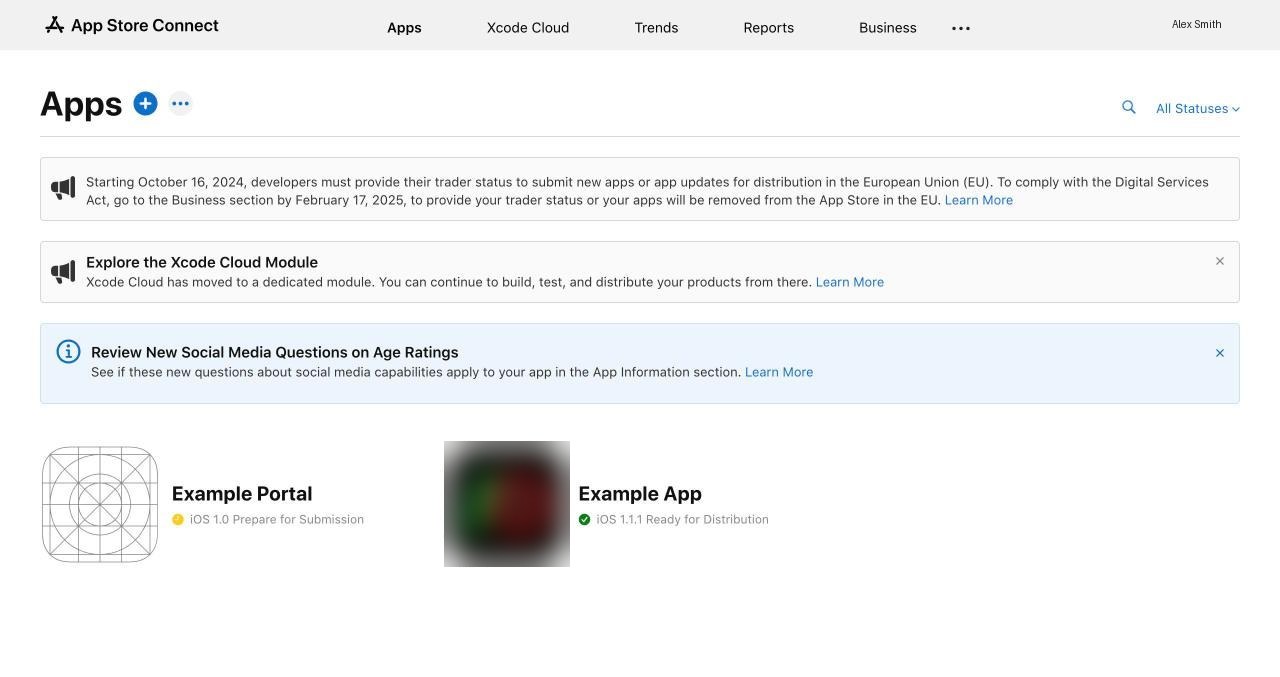
App Store Connect home. Each tile opens a different area. Check your membership details
At developer.apple.com/account, open Membership details. Check that the entity name is your company’s legal name, the expiry date is a year away, and you are shown as Account Holder. Note the Team ID, a 10-character code. It isn’t secret; your developer needs it.
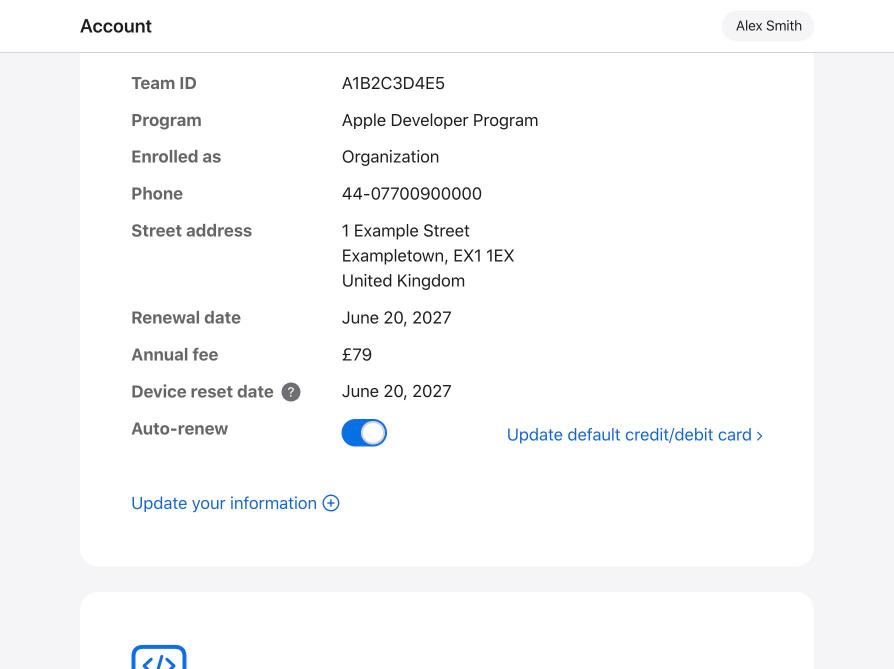
Membership details: entity name, Team ID and renewal date. Check Apple’s agreements
Open the Business area (older screens call it Agreements, Tax, and Banking). Look at the Agreements tab:
If your company’s app is… What you need Free, with nothing to buy inside it Nothing to sign. Free apps are covered by the membership agreement you accepted at enrolment. Just accept any updated agreement Apple shows. Paid, or sells anything inside the app (in-app purchases or subscriptions) The Paid Apps agreement: choose View and Agree to Terms. Then add tax details and bank details in the same area. Watch outOnly the Account Holder can accept agreements. When Apple updates one, an alert appears and nobody can create new apps until you accept it. Accepting the Paid Apps agreement can’t be undone, so only do it if the app will take money.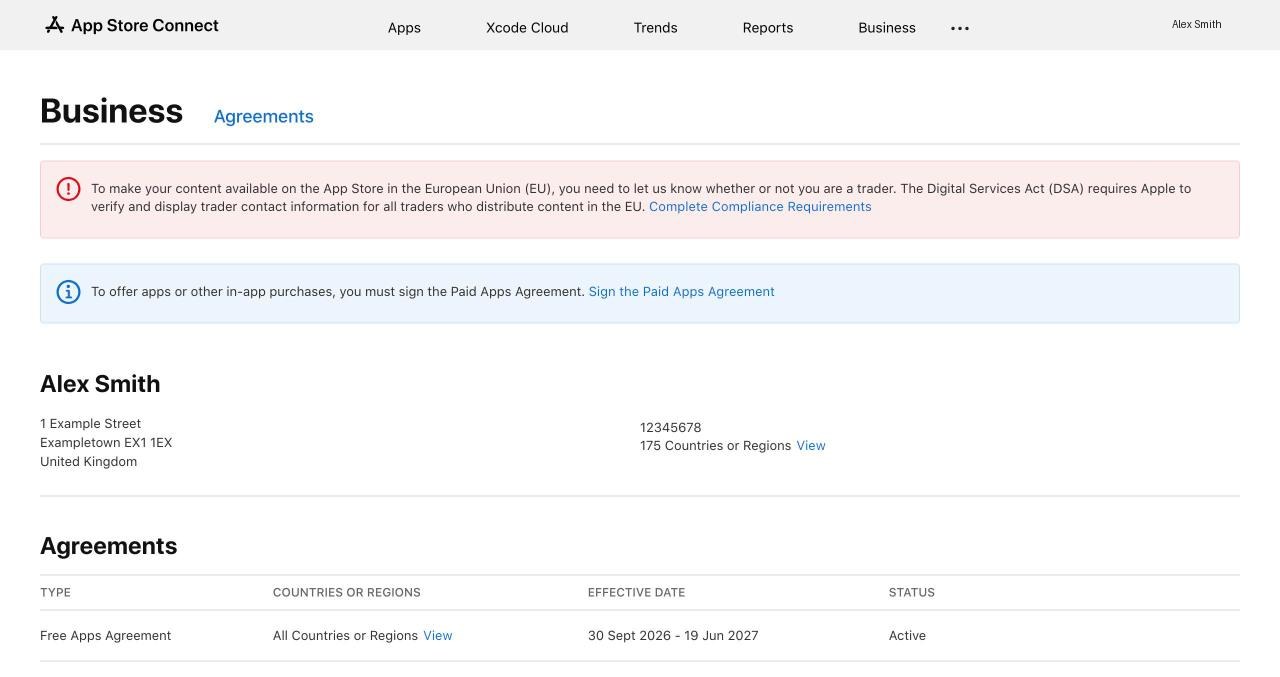
The Business area, where agreements, tax and banking live. Open Users and Access
Back on the home page, choose Users and Access. You’ll see yourself listed as Account Holder. Under People, press the + button at the top left.
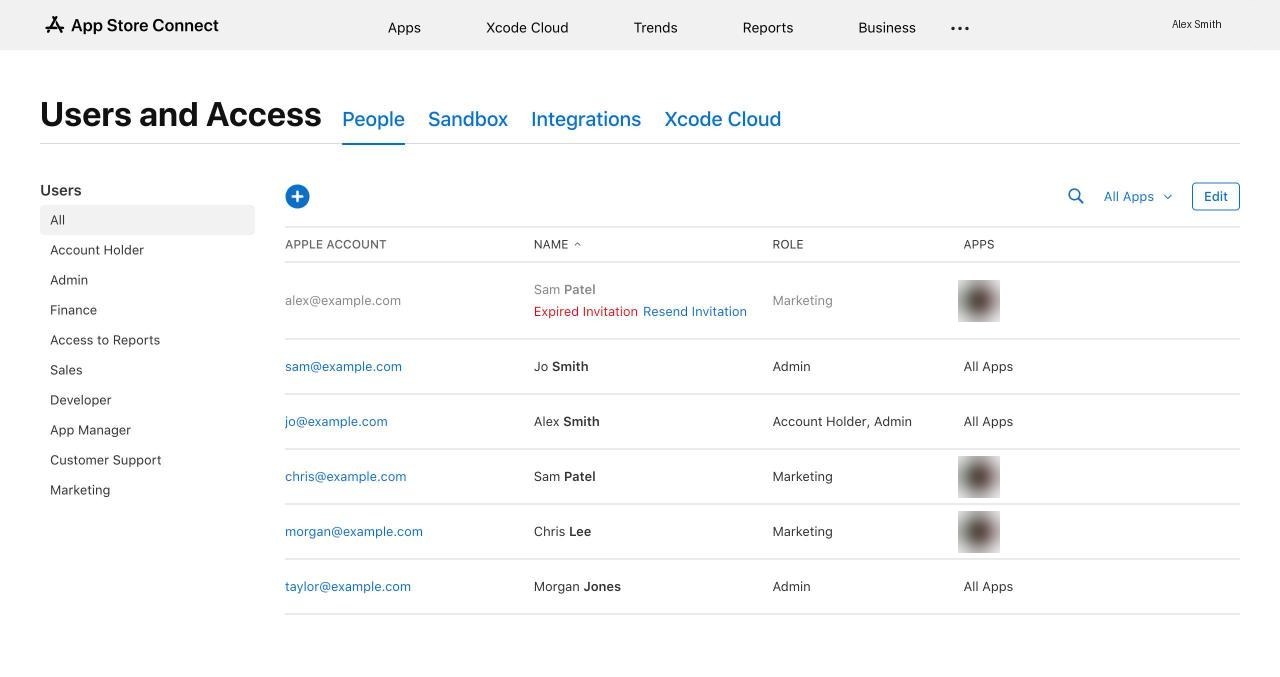
Users and Access. The + button adds a person. Invite your developer as App Manager
Fill in the form:
- First and last name
- Your developer’s name
- The address your developer gives you
- Role
- App Manager only
- Additional resources
- Tick Access to Certificates, Identifiers & Profiles (Apple’s area for the app’s signing certificates and identifiers). If the form offers an option to create apps, tick that too.
Press Next. If Apple asks which apps your developer can see, there are none yet, so choose all apps. Then press Invite.
TipThe invitation expires after 3 days. Tell your developer to look out for it; you can resend it from the same page if it lapses.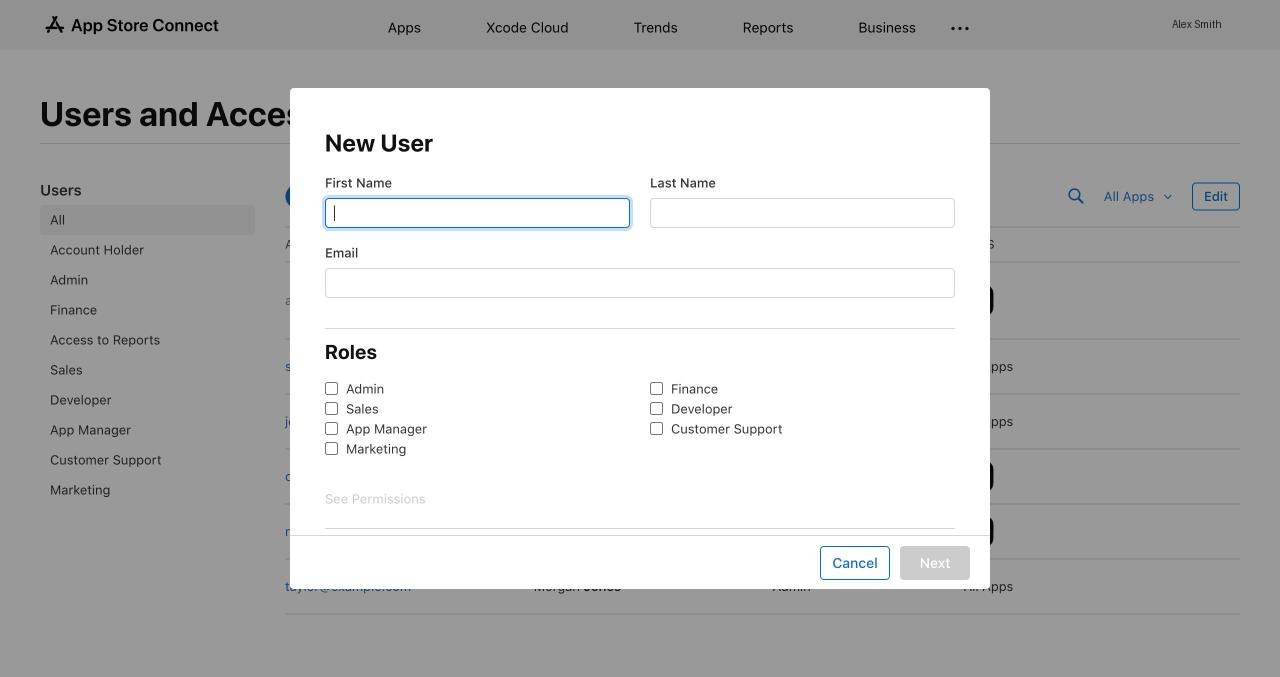
Adding a user: choose App Manager and the extra access to certificates and identifiers. Your developer creates the app’s record
Once your developer has accepted, they register the app’s bundle ID (a unique name for the app, such as
com.yourcompany.app, that never changes) and creates the app’s record in App Store Connect. You don’t need to do anything, but you’ll see it appear under Apps:- Platform
- iOS
- Name
- The name shown on the App Store (your developer agrees it with you; it can be changed before launch)
- Primary language
- English (U.K.)
- Bundle ID
- Chosen by your developer
- SKU
- An internal reference only your company sees
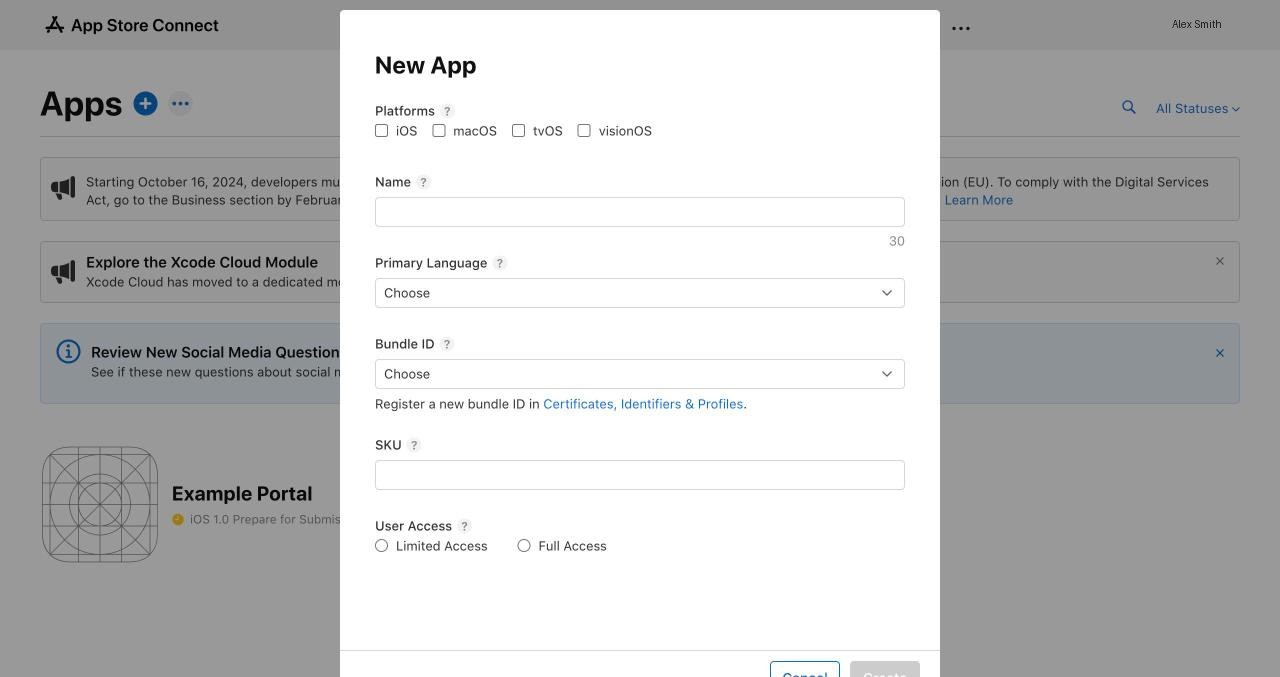
The New App form your developer fills in. Know what only you can do
A few things stay with the Account Holder for the life of the app:
- accept new or updated agreements from Apple, usually within a day or two of the email
- renew the membership each year
- approve changes to bank details
- add or remove people (with any Admin you choose)
TipAdd tech@ as a contact on your Apple Account emails if you can, so agreement emails aren’t missed while you’re away.
When you’re done, send your developer
- Confirmation that your developer’s invitation has been sent
- Your company’s Team ID from the membership page
- Whether the app is free or will take payments, and if so that the Paid Apps agreement, tax and banking are done
If something goes wrong
- I can’t see Users and Access, or the + button
- Check you’re signed in as the Account Holder, not a personal Apple Account. If you belong to more than one team, switch team from your name at the top right.
- Your developer can’t create the app
- Usually an agreement is waiting. Open Business and accept anything marked as needing attention. If it still fails, you can create the record yourself with the details your developer sends.
- The invitation expired
- Open Users and Access, find your developer’s pending invitation and resend it.
- Apple asks for tax forms we don’t understand
- Every developer completes a US tax form, even outside the US. For a UK company it is usually the W-8BEN-E. Ask your accountant if you’re unsure.
Steps checked against the providers’ own screens and help pages on 3 October 2026. Screens change from time to time; if what you see looks different, the same steps usually still apply. Your ticks are saved in this browser only.
Sources: Apple: roles · App Store Connect: add users · App Store Connect: agreements · App Store Connect: tax information · App Store Connect: add a new app · Apple: register an App ID
Need a hand?
JR Cov builds web and mobile apps for businesses of all sizes. If you’d rather not do this yourself, we can help set it up with you, always in your company’s name. Tell us what you’re planning.