
Open your company’s own Stripe account, with Connect
Stripe takes card payments in the app and, with Connect, can pay out to other businesses or people on your company’s platform. The account must be your company’s own from day one: Stripe accounts can’t be moved to a new owner later. While the app is being built, your developer only uses Stripe’s test mode, so no real money moves.
- Who
- A company director
- Your time
- About 30 minutes, plus a 15-minute call with your developer
- Waiting time
- None for test mode; Stripe’s written reply may take days
- Cost
- Free to open; card fees only apply to live payments
- Start
- As soon as you know the app will take payments
Why this matters
Two things depend on this. First, the payment tests early in the project: they must run on your company’s own account, not a borrowed one. Second, Stripe’s written answer on whether it supports your company’s business model. That answer can change how money flows, so you need it early.
Have these ready
- Your work email (you’ll add the shared tech@ address as a contact later)
- Your company’s legal name, company number and registered office from Companies House
- Your phone, for two-step sign-in
- Later, for live payments only: your company’s UK business bank account, and ID for directors and anyone owning 25% or more. Not needed while the app is built in test mode
Step by step
Create the account
Go to dashboard.stripe.com/register. Enter your work email, full name, country United Kingdom and a strong password, then confirm your email.
NeverUse a Stripe account belonging to anyone else, including your developer’s. It must be your company’s, because Stripe accounts can’t be transferred later.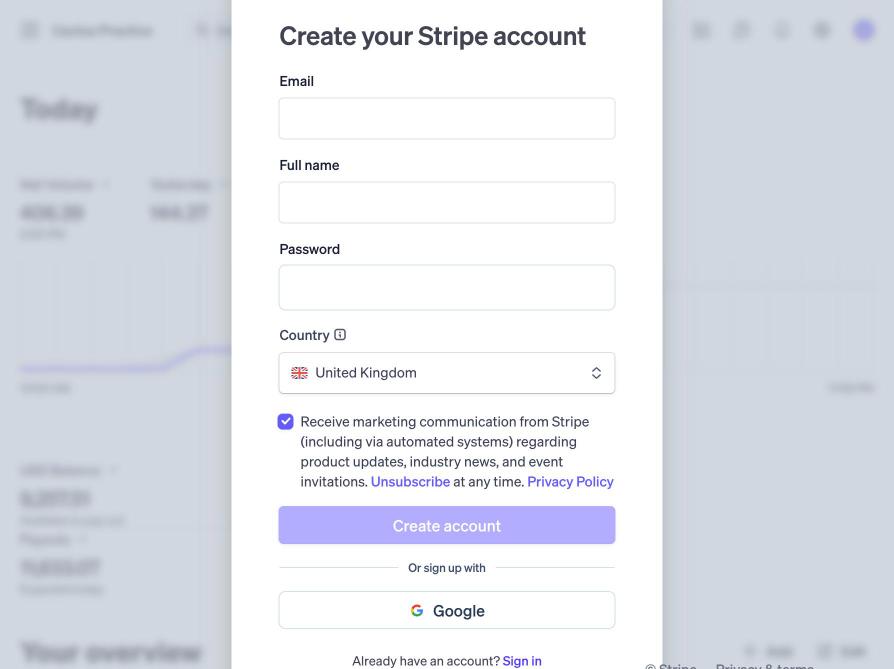
Stripe’s sign-up form. Use the tech@ address and choose United Kingdom. Turn on two-step sign-in
Stripe asks you to add a second step (an authenticator app, text message or passkey). If it doesn’t, open your user settings in the dashboard and turn it on.
Name the account after your company
In the dashboard’s account settings, set the account name to your company’s name and fill in the business details you have: legal name, company number and registered office. You don’t need to switch on live payments or add a bank account while the app is built in test mode.
TipFilling in the business details now saves time on the day you decide to take real payments.Stay in test mode
The dashboard has a test mode switch or a sandbox. Everything your developer builds and tests happens there, with Stripe’s test cards, so no real money moves.
Turn on Connect (with your developer)
Connect is the part of Stripe that pays out to other businesses or people on a platform. Open Connect in the dashboard and choose Get started, which leads to a short platform profile:
dashboard.stripe.com›Settings›Connect›Platform profileSome questions are business decisions, such as who covers refunds and losses on connected accounts. Please book 15 minutes with your developer and fill it in together. Your developer should have recommended answers from the way they’ve designed the payments.
- Settings›Team and security›Team›+ New member
Invite your developer as a Developer
- The address your developer gives you
- Role
- Developer: can manage test keys and webhooks; can’t change the team or bank details
Choose Invite. Your developer then signs in to your company’s account with their own login.
NeverSend API keys by email or chat. With a Developer invitation, your developer creates the keys in Stripe and keeps them in a password manager your company controls, so nobody needs to send one. Ask Stripe in writing whether it supports your company’s model
Stripe lists some kinds of business, such as some kinds of stored value, as ones it can’t support, so get a written answer before any live money moves. Contact Stripe support from the dashboard (Help, then Contact support) and send the message below. Fill in the parts in square brackets (your developer can help with the wording) and adjust anything that’s wrong.
Hello, We are [company name], a UK company, and we have just opened this Stripe account. Before we build further we would like written confirmation that Stripe supports our business model, and advice on the right Connect set-up. How our business works: - [What people pay us for, how they pay (for example by card, in pounds) and how often.] - [Whether we hold any money or credit for people before it is used, and whether it can be withdrawn as cash.] - [Who we pay out to through Stripe Connect, if anyone, and how (for example separate charges and transfers).] - We are building in test mode only. No live payments will be taken until we have your answer and any legal advice we need. Our questions: 1. Can Stripe support this model on our account, given your rules on restricted businesses? 2. Is the Connect set-up above the right one for it, or would you recommend another option? 3. Is there anything we must do before taking live payments, for example a review, restrictions or extra information? Thank you, [Name], Director, [company name]
When you're done, send your developer
- Your company’s Stripe account ID: it starts
acct_and is shown in account settings (it isn’t secret) - Confirmation that you’ve invited your developer as Developer
- A time for the 15-minute Connect call
- A forward of Stripe’s written reply when it arrives
sk_ or rk_) to anyone by email or chat.If something goes wrong
- Stripe asks for bank details or ID now
- These are only needed to take live payments. You can leave them until your company decides to go live; test mode works without them.
- I can’t find Connect or the platform profile
- Your developer can find it on the call. Menus move from time to time, but the setting is always under Connect.
- Stripe says the model isn’t supported
- Forward the reply to your developer straight away. It changes how the payments are designed, and is a decision for your company, with legal advice.
Steps checked against the providers’ public help pages on 30 September 2026. Screens change from time to time; if what you see looks different, the same steps usually still apply. Your ticks are saved in this browser only.
Sources: Stripe: register · Stripe: team roles · Stripe: invite team members · Stripe: restricted businesses · Stripe: Connect
Need a hand?
JR Cov builds web and mobile apps for businesses of all sizes. If you’d rather not do this yourself, we can help set it up with you, always in your company’s name. Tell us what you’re planning.